Music Guru - Play & Stream PRO3.0
Publisher Description
FULL VERSION, WITHOUT ADS!
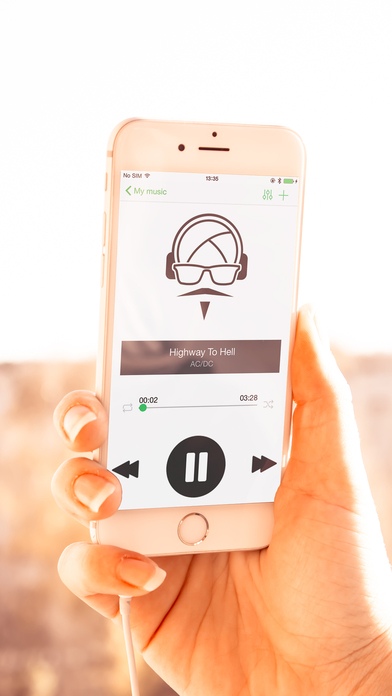
Music Guru - Play & Stream PRO - fully functional music player.
Every person thinks that his music is the best. For the best music every person needs a top player. That's why Music Guru - Play & Stream PRO app can be an excellent choice.
HOW TO USE: This player automatically uploads all tracks (mp3,wav,aiff,m4a formats) from iTunes library. You just need to organize it by playlists like you want. Otherwise, you can listen songs and sort it right from the main track list. Swipe on the song name, choose playlist name and add. Fed up with your favorite music? Turn your player into the radio by switching tabs. You can listen current stations or add your favorite ones by adding a link on it.
Music Guru - Play & Stream PRO features:
- Full synchronization with iTunes
- Playlists sorting and managing
- Equalizer and bass booster
- Album covers for each song
- Radio streaming
- Supports Apple Watch
Unlimited enjoyment for all music lovers.
Requires iOS 8.2 or later. Compatible with iPhone, iPad, and iPod touch.
About Music Guru - Play & Stream PRO
The company that develops Music Guru - Play & Stream PRO is Music Paradise, OOO. The latest version released by its developer is 3.0.
To install Music Guru - Play & Stream PRO on your iOS device, just click the green Continue To App button above to start the installation process. The app is listed on our website since 2015-08-03 and was downloaded 13 times. We have already checked if the download link is safe, however for your own protection we recommend that you scan the downloaded app with your antivirus. Your antivirus may detect the Music Guru - Play & Stream PRO as malware if the download link is broken.
How to install Music Guru - Play & Stream PRO on your iOS device:
- Click on the Continue To App button on our website. This will redirect you to the App Store.
- Once the Music Guru - Play & Stream PRO is shown in the iTunes listing of your iOS device, you can start its download and installation. Tap on the GET button to the right of the app to start downloading it.
- If you are not logged-in the iOS appstore app, you'll be prompted for your your Apple ID and/or password.
- After Music Guru - Play & Stream PRO is downloaded, you'll see an INSTALL button to the right. Tap on it to start the actual installation of the iOS app.
- Once installation is finished you can tap on the OPEN button to start it. Its icon will also be added to your device home screen.
